


Are Portable Gaming Monitors Compatible with Nintendo Switch?
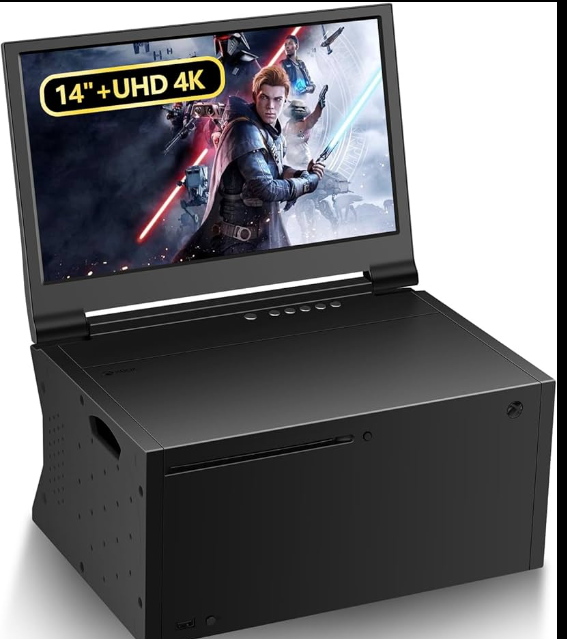
Imagine taking your gaming setup anywhere and still enjoying your favorite Nintendo Switch games on a bigger screen. The Nintendo Switch is already famous for its portability, but sometimes the built-in display feels too small, especially when you want a more immersive experience or want friends to watch you play. That’s where portable gaming monitors come into the picture.
Portable gaming monitors are lightweight displays designed to work with laptops, consoles, and other devices without the bulk of a traditional desktop monitor. Many gamers wonder whether these compact screens can actually work with the Nintendo Switch.
The good news is that portable gaming monitors are generally compatible with the Nintendo Switch. However, the way they connect and function depends on a few factors such as ports, power requirements, and how the console outputs video.
In this article, we’ll explore how portable monitors work with the Nintendo Switch, what features you should look for, and whether they are worth using for your gaming setup.
What Is a Portable Gaming Monitor?
A portable gaming monitor is a slim and lightweight display that can easily be carried in a backpack or laptop sleeve. Unlike traditional desktop monitors that are designed for permanent setups, portable monitors focus on flexibility and mobility.
Most portable gaming monitors are between 13 and 17 inches in size, with 15.6 inches being the most common. They typically support Full HD resolution and use IPS display panels for better viewing angles and color quality.
These monitors usually include HDMI and USB-C ports, allowing them to connect with laptops, gaming consoles, tablets, and even smartphones.
Because they are small and easy to transport, portable gaming monitors are popular among travelers, remote workers, and gamers who want to create a temporary gaming setup wherever they go.
How the Nintendo Switch Connects to External Displays
To understand compatibility, it’s important to know how the Nintendo Switch outputs video.
The Nintendo Switch has a USB-C port at the bottom, but it does not directly output video to a monitor through that port when used alone. Instead, the console relies on its docking system.
When you place the Switch into the dock, the dock converts the video signal and sends it through an HDMI port. That HDMI connection can then be plugged into a TV or monitor.
Because of this setup, any portable monitor that includes an HDMI input can typically work with the Nintendo Switch as long as the dock is used.
This means the portable monitor essentially functions like a small television for the console.
How to Connect a Portable Monitor to Nintendo Switch
Connecting a portable gaming monitor to the Nintendo Switch is relatively simple. The process is similar to connecting the console to a TV.
First, place the Nintendo Switch into its dock. The dock provides the necessary video output for external displays.
Next, connect an HDMI cable from the dock to the HDMI input on the portable monitor.
After that, make sure the monitor has power. Some portable monitors receive power through USB cables, while others require a wall adapter or power bank.
Once everything is connected, the Nintendo Switch should automatically display the game on the portable monitor.
This setup allows you to enjoy a larger screen without needing a traditional television.
Advantages of Using a Portable Monitor with Nintendo Switch
Using a portable gaming monitor with the Nintendo Switch offers several benefits for gamers.
One of the biggest advantages is a larger display. The built-in screen on the Nintendo Switch is convenient but relatively small. A portable monitor provides more viewing space, making games easier to see and more enjoyable.
Another advantage is portability. Instead of relying on TVs in hotels or shared spaces, you can bring your own display anywhere you travel.
Portable monitors also tend to have good image quality thanks to modern display technologies such as IPS panels and Full HD resolution.
For multiplayer sessions, a portable monitor allows multiple players to see the screen more clearly compared to the handheld display.
Important Features to Look for in a Portable Monitor
If you plan to use a portable monitor with the Nintendo Switch, there are a few key features you should consider.
The most important feature is HDMI input. Since the Switch dock outputs video through HDMI, the monitor must support HDMI connectivity.
Another important factor is screen resolution. A Full HD display is ideal because the Nintendo Switch can output up to 1080p resolution when docked.
Screen size also matters. Most gamers prefer a 15.6-inch monitor because it offers a good balance between portability and comfortable viewing.
Built-in speakers can also be helpful if you do not want to rely on headphones or external speakers.
Choosing a monitor with these features ensures a smoother gaming experience.
Portable Monitors vs TVs for Nintendo Switch
Many gamers compare portable monitors with traditional televisions when deciding how to play their Nintendo Switch.
Televisions usually offer larger screens and stronger built-in speakers. They are great for gaming at home and provide a more cinematic experience.
However, TVs are not designed to be portable. Moving them between locations is difficult and impractical.
Portable monitors, on the other hand, are lightweight and easy to carry. They allow you to create a gaming station almost anywhere.
For gamers who travel frequently or enjoy gaming outside the home, portable monitors provide much greater flexibility than a television.
Does a Portable Monitor Improve Nintendo Switch Gaming?
A portable monitor will not increase the graphical performance of the Nintendo Switch, but it can still improve the overall gaming experience.
Because portable monitors are smaller than most televisions, the image often appears sharper and clearer.
Many portable monitors also have low input lag, which helps keep gameplay responsive. This can be useful for fast-paced games where quick reactions are important.
Additionally, having a larger screen compared to the handheld mode makes it easier to see details in games and reduces eye strain during long gaming sessions.
Creating a Portable Nintendo Switch Gaming Setup
Building a portable gaming setup for the Nintendo Switch is easier than many people expect.
A typical setup includes the Nintendo Switch console, the dock, an HDMI cable, a portable gaming monitor, and a power source.
Some gamers also use compact third-party docks to reduce the size of their travel setup.
With the right accessories, you can turn almost any location into a comfortable gaming space within minutes.
This flexibility is one of the main reasons portable monitors have become so popular among Nintendo Switch players.
Are Portable Gaming Monitors Worth It for Switch Users?
For many gamers, portable monitors are a worthwhile investment.
They provide a larger display while keeping the gaming setup lightweight and travel-friendly. Instead of relying on unpredictable hotel TVs or tiny handheld screens, you can enjoy a consistent gaming experience anywhere.
Portable monitors are particularly useful for travelers, students, and gamers who often play in different locations.
While they may not completely replace a large home TV, they offer a convenient middle ground between portability and screen size.
FAQ
Can I connect a portable monitor directly to a Nintendo Switch?
In most cases, you need to use the Nintendo Switch dock. The dock sends video through an HDMI cable that connects to the portable monitor.
Do portable monitors work with Nintendo Switch Lite?
No. The Nintendo Switch Lite does not support video output to external displays, so it cannot connect to monitors or TVs.
What size portable monitor is best for Nintendo Switch?
A 15.6-inch monitor is often considered the best option because it provides a good balance between portability and comfortable viewing.
Do portable monitors require external power?
Many portable monitors need external power from a wall adapter or USB power source. Some models include built-in batteries for extra portability.
Can portable monitors improve the graphics of Nintendo Switch games?
Portable monitors cannot improve the graphics performance of the console, but they can provide clearer visuals and a more comfortable viewing experience.
Final Thoughts
Portable gaming monitors are generally compatible with the Nintendo Switch when connected through the console’s dock using an HDMI cable. They provide a convenient way to enjoy a larger screen while maintaining the portability that makes the Switch so popular.
Whether you are traveling, visiting friends, or simply want a flexible gaming setup, a portable monitor can enhance your Nintendo Switch experience without the need for a bulky television.
For gamers who value both mobility and screen space, portable gaming monitors offer an excellent solution for gaming on the go.

 English
 Arabic
 French
 Spanish
 Portuguese
 Deutsch
 Turkish
 Dutch
Dutch
 Italiano
 Russian
 Romaian
 Greek
Greek
