


Ultimate 2025 Guide: Convert JPG Image to VP3 Format Seamlessly
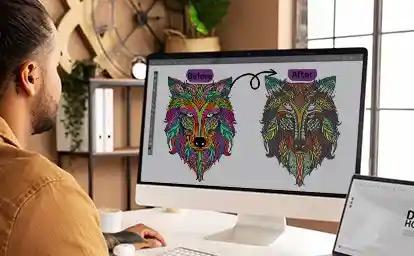
You have a digital image—a new company logo, a custom graphic, a piece of artwork—and you want to bring it to life with the precision of your Husqvarna Viking or Pfaff embroidery machine. That machine, a marvel of modern craft, doesn't see your JPG the way you do. It needs a specific set of instructions to follow, and for many of these machines, that language is the VP3 format. The challenge of bridging this digital divide is common, but in 2025, the solutions are more accessible and powerful than ever. This guide is your roadmap to Convert JPG to VP3 seamlessly, cutting through the confusion to provide clear, effective methods that work right now.
Introduction: Why VP3 is More Than a File Extension
Think of your JPG as a photograph of a finished, beautifully decorated cake. It's a visual goal. Your embroidery machine is a master pastry chef, but it needs the step-by-step recipe—the measurements, the mixing order, the baking time. A VP3 file is that detailed recipe. It doesn't contain a picture; it contains a list of commands: coordinates for every needle drop, the type of stitch to make, when to change thread color, and when to trim.
The act of converting a JPG to VP3 is the process of writing that recipe from the photograph. This is called digitizing. In 2025, "seamlessly" doesn't mean magically—it means having a streamlined, logical process that minimizes frustration and maximizes your chance of a perfect stitchout on the first try. It's about working smarter with the tools available today.
The 2025 Mindset: Preparation is Everything
The most significant upgrade you can make to your workflow isn't a new software subscription; it's how you prepare. A perfect conversion starts with a perfect source.
1. Source the Best Possible Image.
The old advice holds true but is more critical than ever: start with a high-resolution, clean JPG. In 2025, with AI upscaling tools readily available (like those in Adobe Photoshop or free online platforms), you have a backup plan for slightly low-res images. However, a crisp, vector-based source file (SVG, AI, EPS) remains the undisputed gold standard and will make the entire process infinitely smoother.
2. Leverage Modern Pre-Processing Tools.
Before your image touches embroidery software, clean it up using free, powerful editors.
-
Remove Backgrounds Instantly: Use Canva's BG Remover, Adobe Express, or Remove.bg. In seconds, you can isolate your subject on a transparent layer, eliminating a major hurdle for conversion software.
-
Increase Contrast and Simplify: Use the auto-adjust tools in Photopea (a free browser-based Photoshop clone) to boost contrast and clarity. For complex logos, use the "Posterize" filter to reduce the number of colors, which dramatically simplifies digitizing.
-
Define Your Output Size Early: Know the exact dimensions (in inches/cm) for the final embroidery. This isn't an afterthought; it's a key parameter that guides every subsequent decision.
Method 1: Using Next-Gen Embroidery Software (Power & AI Assist)
2025 sees embroidery software becoming more intuitive while offering deeper control. The "seamless" experience here comes from guided workflows.
Top 2025 Software Choices:
-
Wilcom Hatch 3 / 4: A leader in user-friendly professional digitizing. Its strength is a logical, step-by-step workspace that guides you from import to final stitch simulation. The auto-digitizing functions are robust starting points, and its manual tools are comprehensive without being overwhelming. Exporting to VP3 is a direct, one-click action.
-
Embrilliance 2 (or higher): Beloved for its modular, buy-what-you-need approach. Its updated platform continues to focus on making digitizing approachable. Tools like StitchArtist allow for intuitive, point-by-point design creation that feels like drawing, which can be a more seamless mental model for artists than technical digitizing.
-
Brand-Specific Suites: Husqvarna Viking MySewnet or Pfaff Creative suites are deeply integrated with their respective machines. They offer cloud connectivity and direct transfer features that epitomize a seamless ecosystem in 2025.
The 2025 Software Workflow:
-
Import & Set Canvas: Drag and drop your prepped JPG. Set the digital hoop to your target size.
-
Use AI-Assisted Tracing: Click the "Image Stitch" or "Auto-Digitize" button. In 2025, these algorithms are better at identifying key edges and colors. Crucially, view this as a first draft.
-
Edit with Smart Tools: Use the "Simplify" or "Clean Stitches" function to automatically reduce unnecessary stitch points. Manually adjust stitch types—convert blobs to clean satin stitches for borders.
-
Add Underlay Semi-Automatically: Most software now suggests underlay types based on the object. Accept the suggestion, but ensure it's applied (a center walk for fills is standard).
-
Simulate in 3D: Use the real-time 3D simulation to spot gaps or density issues before you stitch.
-
Export to VP3: Go to File > Export For Machine and select VP3 from your machine's list. Save to a connected USB or, in some ecosystems, send directly to the machine via cloud/Wi-Fi.
Method 2: Outsourcing to Professional Digitizing Services (The Ultimate in Seamlessness)
In 2025, the gig economy for craft professionals is thriving. For many, this is the most truly seamless method.
How It Works in 2025:
Platforms like Etsy, Fiverr, and dedicated digitizing websites have streamlined the process. You:
-
Upload your JPG to a service like TheDigitizers or a highly-rated freelancer's portal.
-
Fill out a smart form: select "VP3" as the format, input size, choose fabric type (e.g., "t-shirt," "cap"), and specify thread count.
-
Use integrated payment. Many services now offer AI-generated previews within an hour.
-
Receive your professionally digitized VP3 file within 24-48 hours, often with a stitch preview image.
Why It's Seamless: It removes the entire technical learning curve. You pay for expertise and get a production-ready file optimized by a human who understands stitch physics. This is the best path for complex logos, important projects, or when your time is better spent on other tasks.
Method 3: Understanding the Role of AI Converters (The Evolving Landscape)
Pure "JPG to VP3" converter websites still exist. The landscape in 2025 is one of caution, with a glimmer of future potential.
-
The Current Reality: Most free, automated online converters still produce low-quality files. They often lack underlay, create excessive stitches, and have poor sequencing. They are a gamble that usually ends in wasted thread and time.
-
The Emerging Trend: Some newer platforms are beginning to integrate basic AI that attempts to identify objects and suggest stitch types. While not yet reliable for professional results, they signal where technology is headed. For a simple, single-color shape, they might be sufficient for a casual project with very low stakes.
-
The 2025 Verdict: Use these only for non-critical experiments, and always, without exception, perform a test stitch on scrap fabric.
The Non-Negotiable 2025 Step: The Augmented Test Stitch
"Seamless" doesn't mean skipping validation. It means making validation smarter.
-
Stitch on the Final Substrate: Use the exact fabric and stabilizer from your project. This is non-negotiable.
-
Document the Process: Use your smartphone to take a quick video or photos of the stitchout. This helps diagnose issues like timing or puckering as they happen.
-
Analyze and Iterate Digitally: Notice puckering? Increase underlay density in your software. See gaps? Add pull compensation. The seamless loop is: Test > Diagnose > Adjust in Software > Re-export VP3 > Re-test.
Pro Tips for a Future-Proof Workflow
-
Embrace Cloud Storage: Save your original JPG, your software project file, and the final VP3 to a cloud service (Google Drive, Dropbox). This is your portable, never-lost asset library.
-
Standardize Your Stabilizers: Find a cutaway and tearaway stabilizer you trust and use them consistently. This removes one major variable, making your VP3 files more predictable.
-
Community is Key: Join online forums or social media groups for your specific machine brand. In 2025, collective troubleshooting is faster than any manual.
Conclusion: Your Streamlined Path from Idea to Embroidery
The ultimate goal in 2025 is to remove barriers between your creative idea and its physical execution. Learning how to Convert JPG to VP3 seamlessly is about choosing the right path for your skills and project needs, then executing that path with modern preparation and validation techniques.
Whether you harness the guided power of updated software like Wilcom Hatch, or you leverage the expert network of online digitizing services, you have access to tools that make this process more reliable than ever. By starting with a clean image, following a disciplined digital workflow, and respecting the indispensable physical test, you transform what was once a technical headache into a smooth, predictable, and ultimately rewarding part of the creative process. Now, that image is ready to become thread.

 English
 Arabic
 French
 Spanish
 Portuguese
 Turkish
 Dutch
Dutch
 Italiano
 Russian
 Romaian
 Portuguese (Brazil)
 Greek
Greek
